Home / Invisible Text
Invisible Text Generator: Copy Blank Text and Invisible Characters
Invisible text looks empty but still counts as text. Pick a place, then copy.
Choose your blank text
Pick the character yourself (optional)
Your blank text
ReadyYour blank text is selected in this box. Press Ctrl+C, Cmd+C, or long-press and tap Copy.
Find and remove hidden characters
Paste text from a website, PDF, chat or AI tool. Hidden characters are marked in yellow.
Quick answer: press Copy blank text and paste it where you need an empty message, name or line. The tool starts with Hangul Filler (U+3164), the blank most apps keep. If an app removes it, press Didn’t work? Try another and paste again.
What is invisible text?
Invisible text is one or more Unicode characters that take a place in a line but draw nothing you can see. Your phone stores each one like a letter, so a text box counts it and the send or save button works. A normal space doesn’t get the same treatment: most apps delete spaces from the start and end of a message or name before they save it.
Nobody designed these characters for blank names. Each one does a real job in some writing system, and the blank look is a side effect of that job. The most popular one came into Unicode from an older Korean character set, where it stood in for an empty part of a syllable.
Here is one between brackets: [ㅤ]. Drag across the gap and it highlights like any other letter, because to your phone it is a letter.
Source: Unicode code chart, Hangul Compatibility Jamo (U+3130 to U+318F)
Is invisible text the same as blank text or an empty character?
Yes, in everyday use. Blank text, empty character, invisible letter and blank space symbol all point to the same thing: a character that looks empty but counts as text. People also use the phrase for words hidden with styling, such as white text on a white page. That second meaning gets its own section further down, because it works in a completely different way.
What are the main types of invisible characters?
Each of these is an invisible character with its own job. Six of them cover nearly every real use:
- Hangul Filler (U+3164): the first choice for blank names, empty messages and blank comments.
- Halfwidth Hangul Filler (U+FFA0): a narrower copy of the same filler, and the backup when an app refuses the full width one.
- Braille Pattern Blank (U+2800): the braille cell with no raised dots. Braille readers use it as a real space, and Instagram users use it to keep empty lines in a bio.
- Zero Width Space (U+200B): takes no room at all. Thai and Khmer text sometimes use it to mark word breaks, since those languages don’t put spaces between words. It also lets long links wrap and keeps an @mention as plain text.
- No-Break Space (U+00A0): a real space that stops two words splitting across lines, such as “10 kg” or “Mr. Khan”.
- Ideographic Space (U+3000): the wide space used in Chinese, Japanese and Korean writing.
Lists online with 80 or more “invisible” characters mostly pad the count with tabs, control codes and direction marks. Those show as boxes, break the layout of a message or vanish on paste, and a few of them aren’t blank at all.
How do I copy and paste a blank space?
For a quick blank space copy, pick where you will paste it, press the Copy button, then paste. Step by step:
- Under Where will you paste it?, tap the place, for example WhatsApp message or Instagram highlight. The tool sets the character and the count for that place.
- Under How many?, keep 1 for a message. Name fields often need 3.
- Press Copy blank text. A short note under the button confirms the copy.
- Paste into the app. If the app removes the blank, come back, press Didn’t work? Try another and paste the new character.
Inside some in-app browsers, such as the one Instagram opens links in, the Copy button may do nothing. Press Select manually and copy the selected box with Ctrl+C, Cmd+C or a long press.
What does each option in the tool copy?
Every place in the tool has a first choice and a short list of backups. Try another moves to the next one on the list, so you never have to guess which character to test next. The codes match the character table in the next section.
| Place in the tool | First character | Copies | Backups, in order |
|---|---|---|---|
| Anywhere | U+3164 | 1 | U+2800, U+FFA0 |
| WhatsApp message | U+3164 | 1 | U+2800, U+FFA0 |
| WhatsApp name or About | U+3164 | 3 | U+FFA0, U+2800 |
| Telegram or text message | U+3164 | 1 | U+2800, U+FFA0 |
| Instagram highlight | U+3164 | 1 | U+2800, U+FFA0 |
| Instagram empty lines | U+2800 | 3, one per line | U+3164 |
| Blank comment | U+3164 | 1 | U+2800, U+FFA0 |
| Game name | U+3164 | 1 | U+FFA0, U+2800 |
| Discord | U+3164 | 1 | U+2800, U+200B |
| Website or document | U+00A0 | 1 | U+200B, U+3000 |
How do I copy hundreds of blank spaces at once?
Type any number from 1 to 10,000 in How many?, or tap 10 or 50. Switch on Put each one on a new line to stack empty lines, for example to push a message down the screen. The line under the preview gives the total character count, which helps you stay inside a bio or name limit.
For a visible word repeated many times, Copy Paste 100 Times does that job.
How do I check that the blank character copied?
Paste into the Check it worked box under the Copy button. It names the character it finds and how many it found. If it finds nothing, the clipboard holds something else, so copy again before you paste into the app.
Can I type a blank space without copying it?
Only a No-Break Space, and most apps trim that from names and messages. For documents and web pages, these routes work:
- Windows: hold Alt and type 0160 on the number pad. Alt+255 gives the same character in most programs.
- Mac: press Option+Space.
- HTML: write
for a No-Break Space,​for a Zero Width Space orㅤfor U+3164. - iPhone: save the U+3164 blank as a shortcut in Settings > General > Keyboard > Text Replacement. iOS sometimes refuses a phrase with nothing visible in it.
- Android: add it to the Gboard personal dictionary under Settings > Dictionary > Personal dictionary. Some versions refuse blank entries.
If you need a blank in apps every day, a bookmark to this page is quicker than any of these.
Which invisible character should I use?
The tool picks for you, but the choice follows one simple rule: use a character that apps treat as a letter or a symbol, never as a space. That’s why Hangul Filler comes first for names and messages, and Braille Pattern Blank comes first for empty lines.
| Character | Code | HTML | Unicode category | Removed by trim? | Best for |
|---|---|---|---|---|---|
| Hangul Filler | U+3164 | ㅤ | Letter (Lo) | No | Names, messages, comments |
| Halfwidth Hangul Filler | U+FFA0 | ᅠ | Letter (Lo) | No | Backup for names |
| Braille Pattern Blank | U+2800 | ⠀ | Symbol (So) | No | Empty lines in bios and captions |
| Zero Width Space | U+200B | ​ | Format (Cf) | No, but often filtered | Link wrapping, plain text @mentions |
| No-Break Space | U+00A0 | | Space (Zs) | Yes | Documents and web pages |
| Ideographic Space | U+3000 |   | Space (Zs) | Yes | Wide gaps and indents |
Many people search for Hangul Filler by its code alone, as 3164, 31 64 or U+3164. All three mean the same character.
Names and categories checked against the Unicode Character Database on 9 November 2026.
Why does a blank character disappear or show a box?
That rule matters because of what apps do to a name or message before they save it. Four things can remove or spoil a blank: trimming, normalization, filters and a missing font.
Trimming. Apps clean names and messages by cutting white space from both ends. JavaScript’s trim(), used across the web, removes white space characters and line terminators. No-Break Space and Ideographic Space count as white space. The two filler letters and Braille Pattern Blank don’t, so they survive.
Source: MDN Web Docs, String.prototype.trim()
Normalization. Some sign up systems convert usernames to a standard form called NFKC before saving them, so that lookalike characters can’t create two accounts that look identical. NFKC turns No-Break Space and Ideographic Space into a plain space, which the trim step then deletes. Hangul Filler becomes U+1160, another filler that still isn’t a space, and Braille Pattern Blank stays as it is.
Source: Unicode Standard Annex #15, Unicode Normalization Forms
Filters. Some platforms block a character once it becomes popular for blank names or spam. A blank that worked last month can fail after an app update, which is why the tool keeps backups ready.
Missing font. A box or question mark means the font on that device has no drawing for the character. The character is still there and shows as blank on most other phones.
What should I try when a blank doesn’t work?
Work through these in order, and stop at the first one that sticks:
- Press Didn’t work? Try another and paste the next character.
- Paste two or three blanks in a row. Many name fields have a minimum length.
- Put the blank between two visible letters, so the field never looks empty.
- If nothing passes, the app probably blocks blank names on purpose. A short visible name saves you from a forced reset later.
How do I send a blank message or name on WhatsApp, Instagram and other apps?
Each app runs its own checks, so the steps below follow the same pattern: pick the matching place in the tool, copy, then paste into the right field. Apps change their rules without notice, so try it once before you rely on it.
How do I send a blank message on WhatsApp?
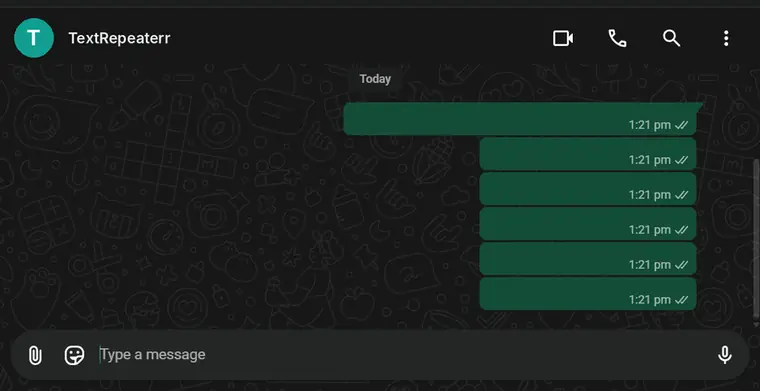
Choose WhatsApp message and press Copy blank text. In the chat, long press the message box, tap Paste and send. The message arrives as an empty bubble. Typed spaces don’t work, because WhatsApp treats a message of spaces as empty.
To take it back, long press the bubble, tap Delete and choose Delete for everyone within WhatsApp’s time limit.
How do I make a WhatsApp name, About or status blank?
Choose WhatsApp name or About. The tool copies three Hangul Fillers, because a single one can trigger a “too short” warning. Open Settings, tap your profile, clear the name or About line, paste and save. The same three blanks work as the text of a status update. For a long message instead of an empty one, use the Long WhatsApp Message tool.
Can I send a blank message on Telegram, Messenger or SMS?
Yes, with the same steps. Choose Telegram or text message, copy, paste and send. If Messenger refuses it, press Try another for Braille Pattern Blank. A message sent by SMS to an older phone can show a small box, because that phone lacks the font.
How do I make an Instagram highlight name blank?
Choose Instagram highlight and copy. Open the highlight, tap More, then Edit highlight, delete the old name, paste and tap Done. A row of blank highlights with only cover images gives a profile a clean, icon only look.
How do I add empty lines in an Instagram bio or caption?
Choose Instagram empty lines. The tool copies three Braille Pattern Blanks, each on its own line, ready to paste between paragraphs. Instagram drops lines that hold nothing, but a line holding a Braille blank isn’t empty, so it stays. Write the caption in the app, then paste the blanks where you want the gaps.
How do I post a blank comment on Instagram, YouTube or Facebook?
Choose Blank comment, copy, and paste it as the comment. It may post and still stay hidden from other people, because some platforms treat comments that look empty as spam.
How do I get a blank name or a plain text mention on Discord?
For a blank display name, choose Discord and paste into Display Name in your profile settings. The username itself still needs letters or numbers. To show @everyone or a #tag as plain text without notifying anyone, put a Zero Width Space straight after the @ or #. It sits under Pick the character yourself.
Can I have a blank name on TikTok or X?
Only the display name. Paste one blank into the Name field. The @username on both apps must contain letters or numbers, so it can’t be blank. Friends who use a screen reader may hear nothing useful for a blank name, so keep that in mind for an account people need to find.
How do I get an invisible name in Free Fire, PUBG, Fortnite, Roblox or Steam?
Choose Game name and place the blank between two letters, for example as the gap in a two word name. Many games reject names made only of blanks, and a rename can cost in-game currency, so test the character in game chat first where the game allows it. Some games treat blank names as a rule break and reset them.
What is hidden text, and is it the same as invisible text?
No. Invisible characters are blank by nature. Hidden text is ordinary text made hard to see with styling: white words on a white page, a font size of zero, or text pushed off screen with CSS. Anyone who copies it, and any program that reads it, still gets the words.
That gap between what people see and what software reads creates risk. Hidden lines in an email or document can carry instructions aimed at an AI assistant that reads them. On websites, Google counts text hidden to influence rankings as spam.
Source: Google Search Central, spam policies: hidden text and link abuse
How can I spot hidden text in an email or document?
- Select everything. Press Ctrl+A (Cmd+A on Mac). White or tiny text shows up as highlighted space with no visible words.
- Paste as plain text. Copy the content into Notepad or TextEdit. Colours and sizes disappear, so every hidden word appears.
- Read the raw email. In Gmail on a computer, open the message, click the three dots and choose Show original.
- Show hidden text in Word. Go to File > Options > Display and tick Hidden text.
How do I make text invisible in Word or Google Docs?
In Word, select the text, open the Font dialog from the Home tab, tick Hidden under Effects and click OK. Google Docs has no hidden option, so people set the font colour to match the background. Both methods only hide words from the screen. The checks above reveal them in seconds, so neither suits private information.
Source: Microsoft Support, Hide and unhide text
How do I find and remove hidden characters?
Hidden characters also travel the other way, slipping into text you copy without you noticing. Paste the text into Find and remove hidden characters on this page. Each one shows as a yellow label, and the list below names it with its code. Remove hidden characters swaps unusual spaces for normal ones and deletes the rest.
These characters cause faults that look impossible:
- a correct password that fails after you paste it
- code that throws an error on a line that looks fine
- a spreadsheet lookup that won’t match two identical cells
- source code that reads one way and runs another, through direction override characters, an attack known as Trojan Source
Source: The Register on Trojan Source, CVE-2021-42574 (2021)
What do the labels in the checker mean?
- ZWSP: Zero Width Space, common in text copied from web pages and chat apps.
- NBSP and NNBSP: No-Break Space and Narrow No-Break Space, which can arrive with text from word processors and AI chat tools.
- BOM: a byte order mark, a leftover at the start of text saved by some Windows programs.
- LRM and RLM: direction marks, common in text copied from Arabic, Hebrew or Urdu pages.
- ZWJ, ZWNJ and VS: joiners and variation selectors that emoji and some scripts need.
- HF, HHF and BRL: the blank characters this tool copies, so you can find a blank someone else used.
Leave Keep characters that emoji and some languages need switched on for normal writing. Emoji such as ❤️ carry an invisible selector, family emoji use joiners, and Persian and Urdu text uses a zero width non joiner between letters. Switch it off to clean code, passwords or spreadsheet data.
Is invisible text the same as iPhone Invisible Ink?
No. Invisible Ink is an iMessage effect that blurs a real message until the receiver swipes over it. Type the message, touch and hold the send arrow, choose Invisible Ink and tap send. It works only in iMessage between Apple devices. A blank copied from this page is empty from the start, so there is nothing to reveal.
Source: Apple Support, Use message effects with iMessage
Is there a blank emoji?
No. Unicode has no blank or invisible emoji. The blank characters on this page fill that need in names and messages.
Do invisible characters count toward character limits?
Yes, each one counts as one character. Some systems count bytes instead, and Hangul Filler takes 3 bytes in UTF-8, so a byte limit fills faster than a letter count suggests.
Can an invisible character contain a virus?
No. It is plain text and cannot run code. The real risk is a hidden character that changes how text behaves, which the checker above finds.
Does ChatGPT add invisible characters to text?
Users have reported narrow no-break spaces (U+202F) in some ChatGPT answers. The reports we checked include no OpenAI statement calling them a watermark. The checker on this page labels them NNBSP and turns them into normal spaces.
Source: OpenAI Developer Community thread on U+202F, October 2025
Should I use invisible characters in HTML?
Use when two words must stay on one line, and CSS margin or padding for layout. Blank letters such as U+3164 belong in apps that reject spaces, not in web page markup.
Can I get in trouble for using an invisible name?
Rules differ by platform. Some allow blank names, while others reset them or remove comments that look empty. A blank name hides nothing from the platform itself, so read the app’s rules before relying on one.
Does it work on iPhone and Android?
Yes. The characters are the same on both systems. The app you paste into decides whether it keeps them.
Is the text I paste here sent anywhere?
No. The generator, the test box and the hidden character checker all run in your browser. Nothing you paste reaches our server.